Data Center Rack Layout: Tutorial & Best Practices

Data center rack infrastructure is the last mile of the physical infrastructure that houses critical IT equipment. Often overlooked, mechanical housing systems play a vital role that far exceeds mere IT equipment placement. These systems are the last mile for secure electrical power delivery to the IT load, a place where the thermal management of IT equipment occurs and also where all structural cabling terminates. If not properly implemented, problems in any of these areas can cause downtime.
This article provides insights into best practices for IT rack management in data center environments.
Summary of key data center rack layout best practices
| Best practice | Description |
|---|---|
| Know which type of IT load will be placed in each rack | The power density in an individual rack can range from a few kilowatts to hundreds of kilowatts, so it is important to accurately understand and forecast the rack’s IT load and distribute it accordingly. |
| Decide on a rack type | From a mechanical standpoint, racks differ significantly by application, including small closed racks for office use, standard in-row low-density racks, and novel AI load racks. |
| Align the racks’ characteristics with cooling requirements | Apply cooling strategies to specific IT load profiles and adapt rack design accordingly so you ensure proper airflow management, accommodate thermal load, and maintain efficient, reliable operation. |
| Ensure redundant rack powering | Equip each IT rack with dual, independent power inputs, diverse power distribution units (PDUs), and separate upstream paths. This approach ensures continuous operation, enables maintainability, and prevents single points of failure within the rack. |
| Install cabling in a structured manner | Route and organize cabling within each IT rack using defined pathways, segregation, and management accessories to maintain clear airflow, simplify maintenance, and reduce operational risks. |
| Monitor the rack environment | Deploy sensors and monitoring within each IT rack to track temperature, humidity, airflow, and power conditions. |
| Introduce security mechanisms | Implement physical security on the racks, such as protected doors and an access control system. |
| Track changes and keep documentation up to date | Improve capacity planning by registering and documenting rack layout changes that affect mechanical space, power consumption, cooling capacity, and the provisioning of power and network cables. |

netTerrain. Battle-tested & affordable DCIM Software
-

Manage data center floor plan, rackspace, cabling, power distribution, and more
-

Use analytics to optimize data center capacity and energy costs
-

Deploy quickly using asset discovery tools and pre-built integrations
Know which type of IT load will be placed in the rack
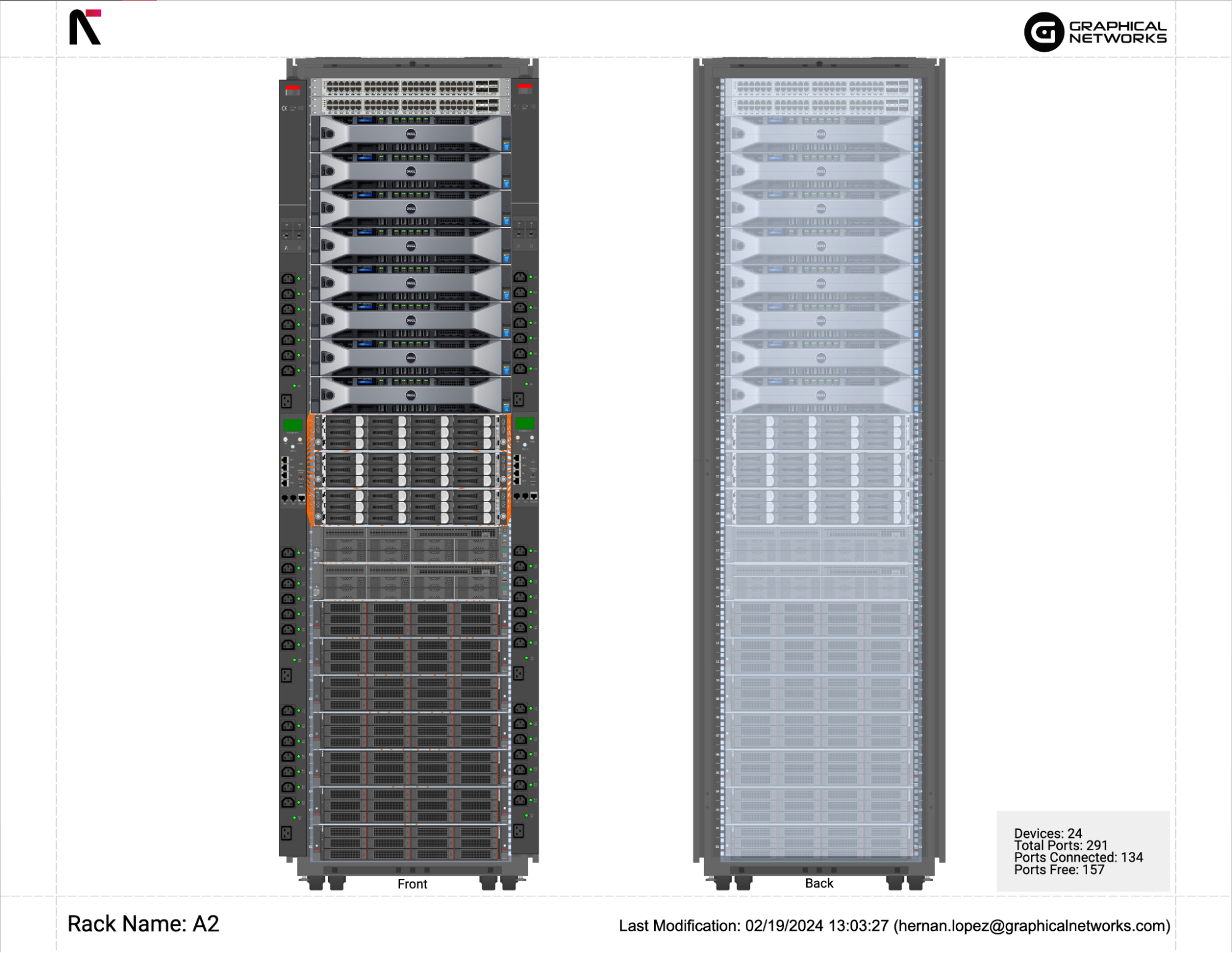
When planning the rack layout, understanding which types of IT equipment will be housed in the rack is an essential starting point that affects subsequent decisions regarding design, implementation, and operation. Servers, routers, switches, and other components all have different dimensions—especially height but also weight—power supply needs, and cooling requirements. In modern data centers that use advanced computational chips powering AI infrastructure, the impact of different components will be significant on IT rack design.
Traditional data center loads
In the most common use case, IT equipment deployed in a single rack ranges from 2 kW to 10 kW, though in more recent deployments it can reach up to 30 kW. These loads include standard x86 servers, routers, network switches, and storage. All of these components have stable, predictable power needs and thermal load profiles.
Due to their relatively low power density, these components can be easily managed with standard air-cooling strategies. These systems are typically connected via standard fiber-optic or copper Ethernet cables.
AI data centers
The new chipsets used for machine learning and AI represent a significant deviation from the traditional paradigm. Graphics processing units (GPUs) and AI accelerators require power densities that can exceed 50 kW per rack, while the latest generations can easily run at 100-200 kW per rack. When a single rack is exposed to such high power levels, cooling becomes a significant challenge for designers, who must resort to cooling media other than air because of air’s limited thermal capacity. This is where water-cooling strategies need to come into play.
In terms of connectivity, standard cabling is insufficient here due to low bandwidth, and alternatives such as InfiniBand 400 GbE interconnectors are mandatory.
Although solutions exist, their implementation can significantly affect cabling density and weight distribution. AI processors exhibit high volatility in their power profiles, leading to higher electrical voltage and thermal stress on electrical cables and other components in the power train.
Flexibility for the future
When planning the rack layout, make sure not to focus not just on present requirements—allow for a minimum 20-30% of additional capacity, which will ultimately facilitate unplanned expansions. This capacity should be reflected in all capacities: physical space, electrical power, cooling, and network cabling provisioning.
Focusing on a single rack may not be enough to future-proof your operation. Consider using racks that support vertical expansion, but be mindful of limitations such as PDU and busway power capacity, floor loading, room height, cooling provisioning, and local fire codes. Also, make sure the entire IT room, the whitespace, layout can support horizontal expansion, in case you know this will be needed in the future.
Decide on the rack type
Rack selection depends on multiple factors, such as application environment, type of IT load, and operational performance.
Rack types and topologies
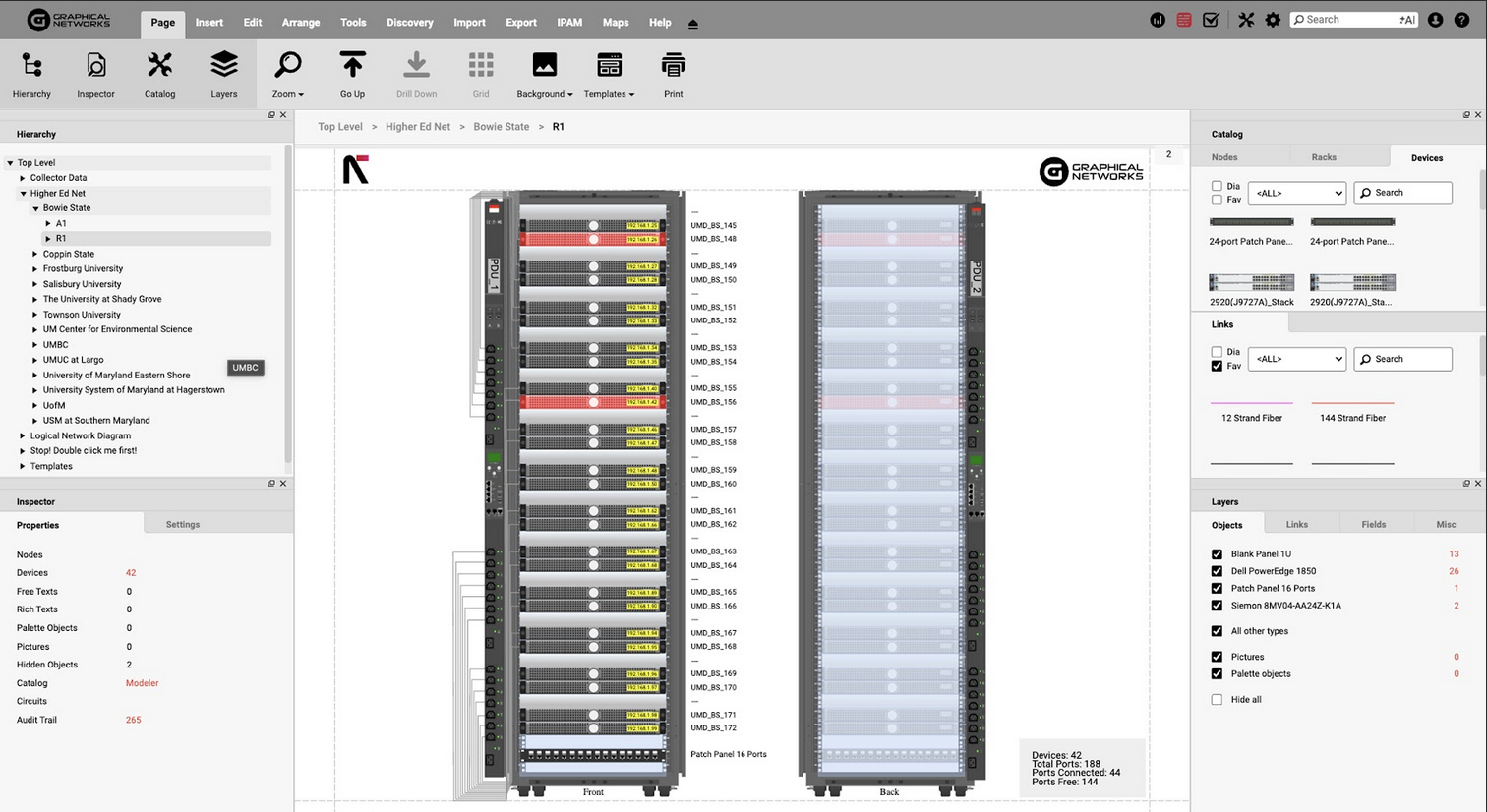
Open-frame racks usually house telecommunications equipment, allowing for easier convection cooling. Closed racks protect IT equipment from dust and debris and restrict access to unauthorized personnel. In small enterprise applications where racks are placed in office space, it is common to use fully enclosed small, standalone, or wall-mounted racks with doors. In data center environments, the most common is the 19-inch-wide rack with perforated doors, allowing airflow while restricting access.
A critical architectural decision involves the network topology:
- Top-of-rack (ToR): Switches are mounted at the top of each rack. This switch placement reduces cable length to the servers, simplifies cabling management, and improves scalability as new racks are added in the horizontal alignment. The downside of this method is that it increases the number of switches required and can complicate power distribution if not meticulously planned.
- End-of-row (EoR): Switches are centralized at the end of each rack row. This method reduces the total number of switches and optimizes the management, but it results in longer cable runs, increasing cabling complexity.
Dimensions, weights, and floorplans
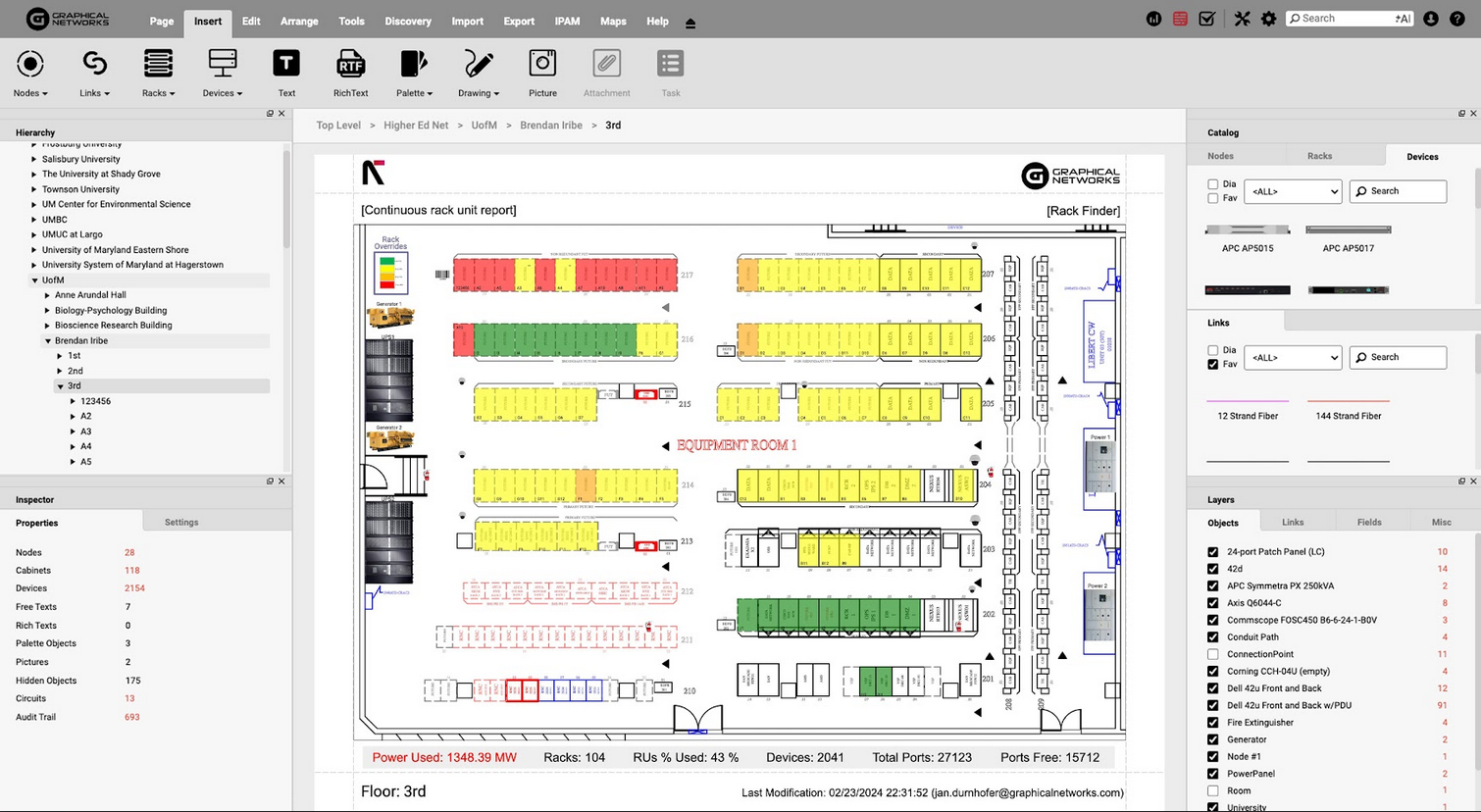
The standard IT rack width is 19 inches (482.6 mm), with height measured in “units” (U), where 1U equals 1.75 inches (44.45 mm). Common rack heights include 42U, 47U, and 52U. Rack depth ranges from 600 mm for networking gear to 1200+ mm for server equipment. Weight capacity ranges from 1,000 kg to 2,000 kg per rack, with AI loads requiring placement on a reinforced floor.
Floorplan growth must be planned, controlled, and tracked at all times. Advanced DCIM tools like netTerrain allow administrators to gain real-time insight into current capacity utilization and prospective reserved capacity. This advanced planning and control ensure that power and cooling capacity are properly allocated and planned for before installation begins.
Modular design and anchoring
Modular rack design allows engineers to rapidly deploy and reconfigure around common form factors. This interoperability reduces procurement lead times and enables engineers to scale or reconfigure capacity incrementally, adding or relocating rack units as demand shifts rather than committing to wholesale infrastructure changes. In high-density and colocation environments, in particular, this flexibility translates directly into reduced downtime and lower operational costs over the facility’s lifecycle. Sophisticated modeling in platforms like netTerrain enables the visualization of these modular systems and their integration into the data center environment.
To ensure safety and structural integrity at the mechanical level, the racks need to be anchored to raised floors or concrete slabs to prevent tipping during seismic events or equipment installation. Make sure to follow local legislation regarding the appropriate use of hardware for anchoring.
Align the rack’s characteristics with cooling requirements
Cooling strategy directly impacts rack selection and placement within the overall layout. In this respect, the most important aspect is the impact of the internal units’ thermal management systems used at the room level, as their capacity and placement affect the formation of the IT rows (also known as rack horizontal alignment). The opposite is also true: IT rack densities impact the choice of cooling strategies.
Depending on rack power density, three main cooling strategies may be employed, as shown in the table below.
| Cooling Approach | Characteristics | Density Range |
|---|---|---|
| Air Cooling | Hot/cold aisle containment, CRV units, DX technology | 5–30 kW/rack |
| Liquid Cooling | Door water cooling, cool loop systems | 20–100 kW/rack |
| Immersive Cooling | Single-phase or two-phase liquid immersion | 50–300 kW/rack |
For traditional IT loads, air cooling with containment is the most cost-effective solution. Consider implementing the cold or hot aisle, as this improves cooling efficiency by 30-40%.
Liquid cooling is used for higher power densities, usually above 10 kW. This strategy directly impacts rack selection, as cooling is achieved through door-mounted heat exchangers (HEX). This cooling method is achieved by directly using chilled water circulating through pipes mounted in the rack. This approach is also used with AI applications.
Immersive cooling is a relatively new concept in modern data centers in which the active equipment is submerged in a dielectric fluid. Because the liquid has a higher thermal capacity, engineers can maximize the system’s thermal efficiency. There are two variants of the immersive cooling: single and two-phase systems. Single-phase immersion systems keep the fluid below its boiling point by circulating it, while two-phase systems use the latent heat of vaporization.
The immersive cooling method is technically the most suitable for AI loads, but it is also the most expensive and most challenging to maintain. This approach directly impacts rack selection because the cooling system is the rack itself. These types of “racks” have greater width and lower height to allow replacement of active IT components. For that reason, this approach directly impacts the layout as well as floor space.
In addition to pure air or liquid cooling techniques, engineers may consider a hybrid approach that combines both. In these cases, part of the power-dense IT equipment is cooled by liquid cooling, while the remaining rack equipment (for example, networking equipment) is air-cooled.
Computational fluid mechanics (CFD) plays a vital role in layout planning, especially during the design phase of high-density systems. Although the method is used ubiquitously in the preconstruction phase, due to the limitations of most DCIM, CFD analysis is very seldom conducted during the exploitation phase. A solution from netTerrain can be useful here because it integrates this capability into its platform. Integration of CFD analysis into the DCIM allows engineers to model airflow and identify hot spots across a live facility.
Ensure redundant rack powering
Power supply architecture is one of the most important segments to consider in data center design. IT racks need to accommodate a dual-power-supply configuration to facilitate maintenance or fault handling on either side of power distribution.
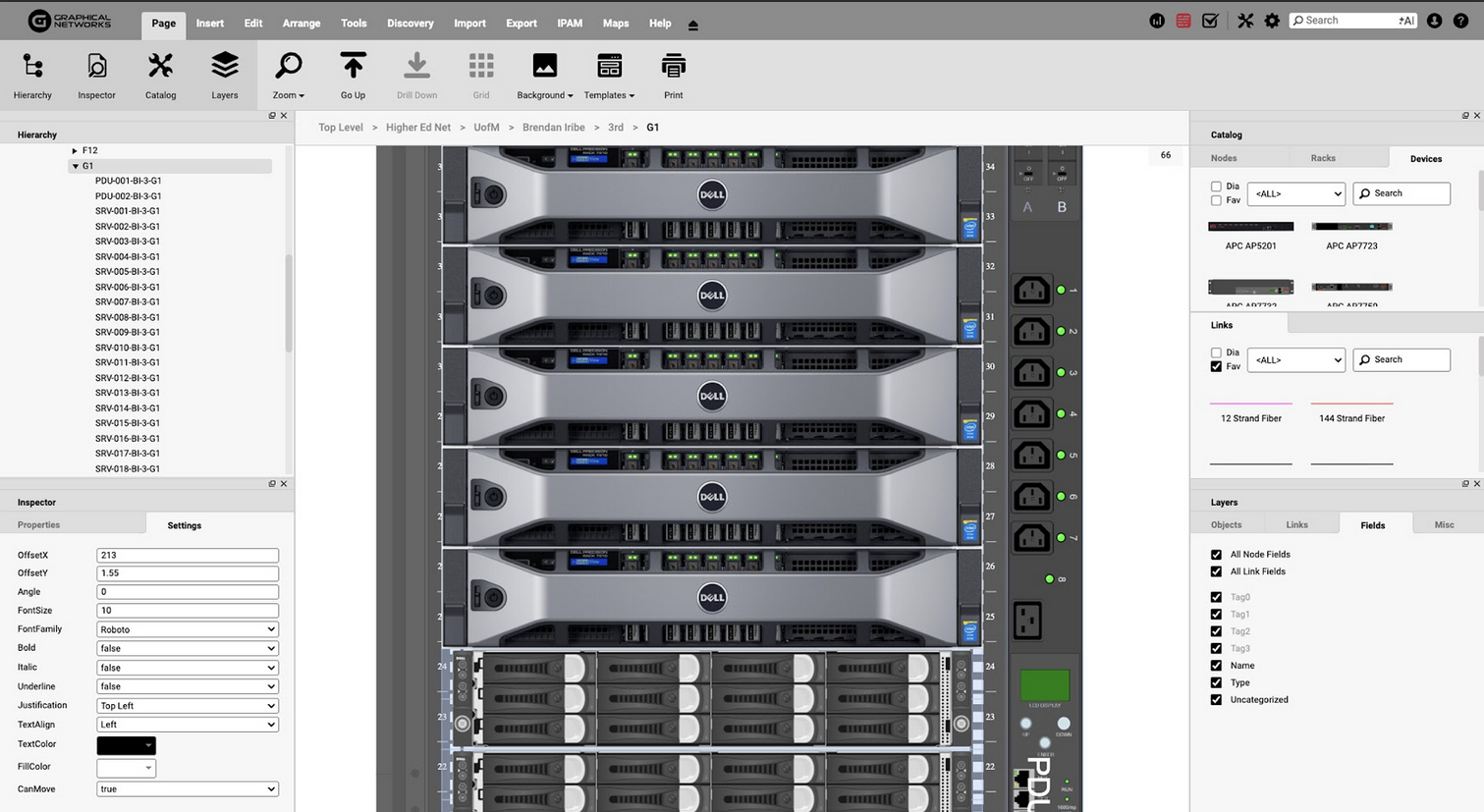
In larger data centers, power is most often distributed via overhead busbar systems mounted above the racks, running horizontally. Typically, there are two busbar systems, each coming from one side, distributing the power from two independent power paths. From the overhead busbar system, power flows via tap-off boxes to the racks, which are connected to rack-level power distribution units (PDUs), which are much smaller electrically and physically than row- or room-level PDUs. Rack-level PDUs are commonly mounted on the left and right sides of the rack, each fed from a separate busbar system. The alternative is for the rack to get power cable input from the top or from the bottom (sometimes from the bottom via a dedicated busbar system).
Good practices with respect to rack power supplies include the following:
- Choose a modular rack-level PDU if you are scaling the load to support a pay-as-you-grow strategy.
- For cabling and underfloor entry, ensure that cables are neat so they do not disrupt airflow under the floor.
- Use static transfer switches (STS) for single-core loads to enable fast transition of the power supply from one side to the other.
Install cabling in a structured manner
Make sure to structure and neatly arrange all cables and power, network, and communications equipment. A structured approach assures traceability and maintenance success while also creating clear airflow pathways, reducing cable overheating, and contributing to overall facility safety.
Use color coding to distinguish cable types and their purposes. Blue cables typically indicate data connections, yellow indicates fiber optics, red indicates critical power circuits, and green indicates grounding conductors. Make sure to label the cable ends on both sides to allow quick identification during maintenance.
Cable entry points are located at the tops and bottoms of racks, with dedicated grommets for insulation protection. Strap the bundles at regular intervals to secure them without crushing the conductors. To organize cables along the rack side, use vertical cable managers and horizontal managers to distribute cables across the rack width.
Separating power and data cables lets engineers minimize electromagnetic interference and adhere to electromagnetic compatibility best practices. Maintain the separation distance required by the applicable cabling standard or manufacturer guidance. For example, NVIDIA recommends a minimum 30 cm clearance in its data center cabling guidance, depending on the installation context, to help reduce electromagnetic interference and preserve signal integrity. When in doubt, refer to standards such as TIA-569 or other local regulations. When it comes to fiber optic cables, pay special attention to the bend radius to prevent fiber damage.
Monitor the rack environment
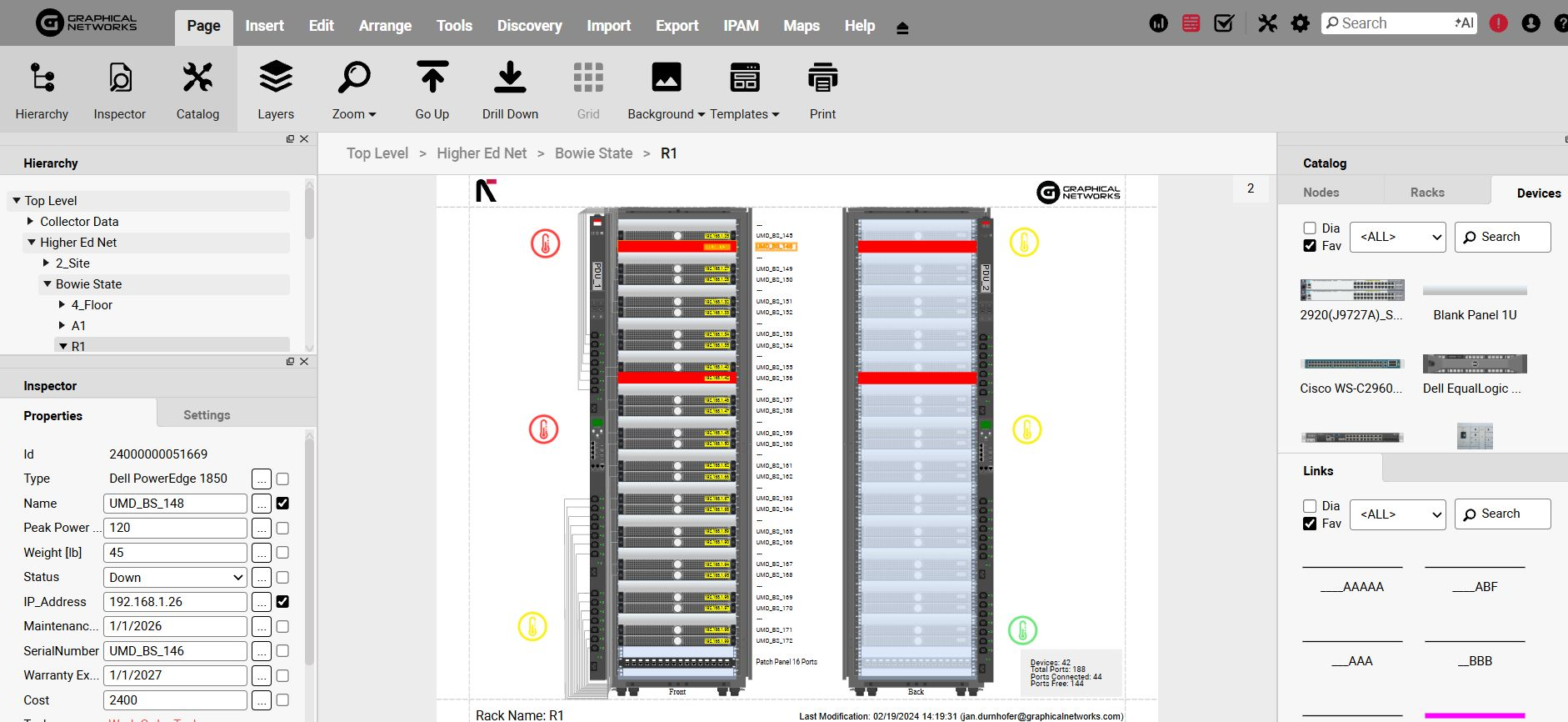
Real-time environmental monitoring helps detect issues before they turn into failures. Implement rack-level sensors to measure temperature at intake and exhaust points, humidity levels, and airflow velocity. For power consumption, use smart rack-level PDUs with connectivity. Position temperature sensors at different heights to identify hot spots. Monitor humidity levels to prevent condensation and electrostatic discharge.
Common communication protocols in use for environmental monitoring include SNMP for integration with building management systems, Modbus for industrial control applications, and REST APIs for cloud-based monitoring platforms. Configure alert thresholds to trigger notifications when conditions exceed safe operating ranges.
Pay attention to rack-level PDU selection so that PDUs can track voltage, current, and power factor at the circuit level. Integrating them with DCIM platforms allows for capacity planning and trend analysis. After gathering all the data, analyze it to identify seasonal patterns and support predictive maintenance scheduling.
Introduce security mechanisms
When it comes to security in IT environments, the first thing that usually comes to mind is cybersecurity. However, an area that is sometimes overlooked is physical security. This type of security is implemented at different levels throughout the data center through access controls, mantrap systems, biometrics, and specialized protocols.
A good practice is to implement surveillance cameras at the room or row level. In the context of IT racks, this could mean implementing cages at the row or individual rack level. The simplest method of individual rack protection is to implement a locking mechanism on the access doors governed by either a mechanical or an electronic system.
Change access codes regularly and adhere to security procedures in line with the principle of least privilege. Regularly audit the documentation with access logs to get insight into potential unauthorized access attempts.
Track changes and keep documentation up to date
Make sure all documentation is accurate and up to date to support capacity planning, troubleshooting, and regulatory compliance.
Data center infrastructure management (DCIM) platforms aggregate all rack documentation, including equipment inventory, power connections, cooling requirements, operating points, and network architecture. Use DCIM to implement change management processes to govern documentation updates before making modifications.
Be mindful of compliance in this context, as regulatory frameworks such as PCI-DSS, HIPAA, and SOC-2 place a heavy emphasis on documentation. These standards may require proof of physical security controls, environmental monitoring logs, and strict change management procedures.
Don’t forget to keep the documentation up to date, as failing to do so would make passing an audit nearly impossible. DCIM tools can serve as a single source of truth and ensure that physical reality matches the documentation on record.
Document, track, and update rack layouts that indicate equipment placement, cable routes, and power distribution. Record power consumption, airflow, temperature, and humidity across all racks. Track warranty and maintenance details for all components and systems in an aggregated database.
Regularly audit the accuracy of documentation and compare it to reality. In case of discrepancies, indicate the changes and investigate. Use documentation version control to maintain historical records for compliance and operational robustness.

Common mistakes to avoid
Here are some of the common mistakes associated with IT racks in data centers:
- Underestimating power density: Do not assume that future equipment will fit within the current available power capacity. Account for the exponential growth of AI and high-performance computing loads. Reserve space, power, and cooling for future growth and avoid expensive retrofits later.
- Ignoring weight limits: Don’t underestimate the weight of GPU clusters. Failing to pay attention to the weight distribution across the floor can have severe consequences for the facility’s operations and the crew’s lives and safety.
- Poor cable management: Be mindful of the separation between power and data cables and of overcrowded cable trays, which can lead to overheating and make troubleshooting difficult.
- Lack of redundancy: Do not rely solely on a single power path or cooling loop that represents a single point of failure.
- Inadequate documentation: Make sure to regularly update the documentation set via DCIM tools after changes to avoid “ghost” assets and inaccurate capacity planning.
- Neglecting airflow: Carefully plan equipment installation to preserve hot/cold aisle containment and avoid hot-air recirculation and thermal hotspots.
Infrastructure clarity for organizations across all industries
Conclusion
Rack layout best practices combine careful planning, quality equipment, and disciplined operations. Organizations should invest in proper rack design to achieve higher availability and energy efficiency while lowering the total cost of ownership. As data centers evolve toward an AI paradigm, higher power densities and specialized requirements increase the need for flexible infrastructure designs that enable seamless upgrades.
To achieve operational success, cross-functional collaboration between facilities, IT, and security teams must be orchestrated. By using continuous monitoring, logging, and traceable documentation, data center operators improve the quality of their work and reduce the likelihood of damage caused by data center downtime.
Leverage advanced tools for modeling, simulation, and management, adhere to best practices, and build rack environments that support current operations while seamlessly accommodating future growth. Remember that the cost of prevention is always lower than the cost of recovery. Rigorous rack management discipline is what operational reliability is built on.
